




You can connect your app to ChatGPT and Claude without rebuilding your backend. Model Context Protocol (MCP) puts a thin server in front of the API you already have. Both assistants can then check an order, a claim or a booking for your customers, live.
Without that path, an assistant asked “where is my order?” can only apologise or guess. It cannot see your system’s live state. MCP gives it a standard, controlled way in.
This guide is for tech leads who own an app, write code and want to connect their app to ChatGPT. It covers what to expose first, how OAuth works, how your app gets listed in ChatGPT and Claude, and when a direct API integration is enough.
In short: pick three to five read-only jobs your support team already handles. Wrap them in a small remote MCP server with OAuth. Test it in ChatGPT’s developer mode and as a Claude custom connector, then submit it for review to OpenAI and Anthropic.
What MCP is, and why ChatGPT and Claude both use it
MCP is an open protocol that standardises how AI assistants connect to outside systems. Anthropic introduced it in November 2024. OpenAI, Google and Microsoft have since adopted it, so one MCP server can serve several assistants instead of one custom integration per vendor.
Think of it as a menu written for an AI. It lists what your system can do, what each action needs as input and what it returns. The assistant reads the menu and decides when to order.
An MCP server usually sits in front of an API you already have. You don’t rebuild your backend; you describe a small part of it so a model can use it safely. For the full background, read our complete guide to Model Context Protocol.
Where an MCP server sits in your app’s architecture
Three roles matter. The host is the AI application, such as ChatGPT or Claude. Inside it, an MCP client talks to your MCP server, which you run and which calls your own APIs or databases.
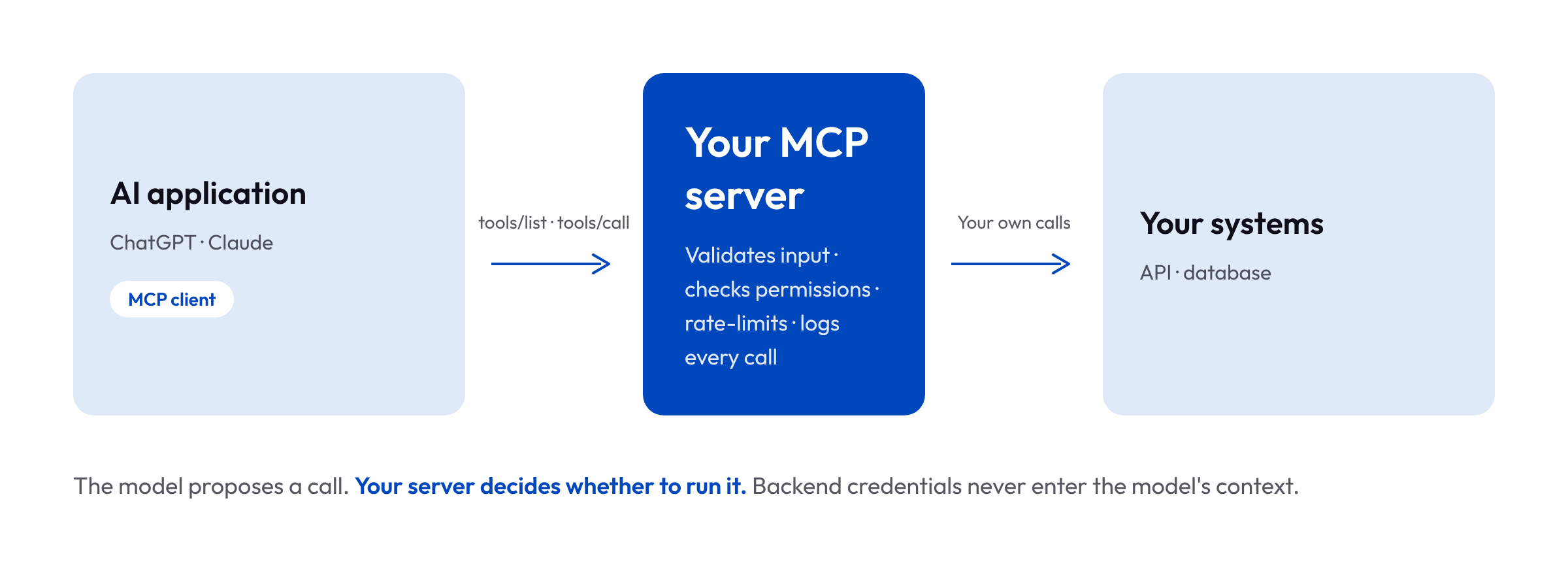
The model never connects to your systems directly. It proposes a tool call; the request reaches your server, which decides whether to run it. That boundary is where your controls live: input validation, permission checks, rate limits and audit logs. Backend credentials stay in your server’s environment and never enter the model’s context.
For an architect, the useful mental model is a new public edge service with an unusual client. Treat it with the same discipline as any API you expose to the internet.
What happens when a customer asks ChatGPT about your app
Take an insurer that lets customers check claims from ChatGPT. Here is what happens behind one question.
- The assistant discovers your tools. When it connects, the MCP client asks your server which tools exist (
tools/list). It gets back each tool’s name, description and input schema. - A customer asks: “Where is my claim 4471?” The model picks
get_claim_statusand fills in the claim number. Nothing has touched your systems yet. It’s only a proposal. - Your server decides. The request reaches your server (
tools/call), which checks that the user’s token covers claim 4471. Only then does it call your claims API. - The answer stays small. Your server returns the three facts the model needs: status, last update and next step. It doesn’t forward the 200-field record your backend holds.
- The customer follows up: “Pay it to my new account.” The assistant knows which claim this is, because the host keeps the conversation. Knowing the claim is not the same as being allowed to change the payout, though. Your server still checks the rights and asks the user to confirm.
Two things follow from this. First, conversation context lives in the assistant, not in the protocol. Your server must never treat “we talked about it earlier” as permission.
Second, MCP can’t do anything your backend doesn’t allow. A read-only database credential stays read-only, whatever the model asks for.
What a good tool definition looks like
Here is the claim tool from the example above, as your server would describe it:
{
  "name": "get_claim_status",
  "title": "Get claim status",
  "description": "Returns the status of one insurance claim for the signed-in customer: current status, date of the last update and the next step. Use it when the customer asks where a claim stands. It changes nothing.",
  "inputSchema": {
    "type": "object",
    "properties": {
      "claim_id": { "type": "string", "description": "Claim number, for example 4471" }
    },
    "required": ["claim_id"]
  },
  "annotations": {
    "readOnlyHint": true,
    "destructiveHint": false,
    "openWorldHint": false
  }
}
The description does most of the work. It says what the tool returns, when to use it and that it’s safe, because that’s what the model reads before it decides.
The title and annotations matter too. Both OpenAI and Anthropic check them when you submit your app, and a readOnlyHint that doesn’t match what the tool really does is a common reason for rejection.
The structured result your server sends back stays just as small:
{ "status": "In review", "last_update": "2026-10-12", "next_step": "Expert visit scheduled" }Three fields, no internal IDs, no audit trail. The model has less to misread, and less of your data ends up in someone else’s context window.
What your app should expose: tools, resources and prompts
An MCP server offers three kinds of things:
- Tools are actions the assistant can call, such as
check_order_statusorfind_branch_opening_hours. - Resources are data the assistant can read, such as a product catalogue or a policy document.
- Prompts are reusable templates that guide the assistant through a task your users repeat.
Most first projects only need tools. Take a retailer: the useful first set is short. Check stock in a store, track an order, look up the returns policy. None of these change anything in your systems, which matters more than it seems (see “Start with internal users and read-only tools” below).
Six steps to connect your app to ChatGPT and Claude
To connect your app to ChatGPT and Claude, follow these six steps:
- Pick the jobs, not the endpoints. List the questions people already ask your support team. Choose three to five that your API can answer today. Exposing your whole API is the most common mistake we see: with 80 tools, the assistant gets confused and picks the wrong one.
- Decide who is calling. Public information, like opening hours or a catalogue, needs no login. Anything personal needs the user to sign in. Remote MCP servers use OAuth for that, on top of your identity provider. The assistant then acts with that user’s permissions, never more.
- Write descriptions for the model, not for developers. The model chooses a tool from its name and description. “Returns order status for a given order ID, including carrier and expected delivery date” works. “GET /v2/ord/status” does not. Return only the facts the model needs, not the raw backend object.
- Build a thin server and host it. The server translates between MCP and your API. To be reachable from ChatGPT or Claude, it must run remotely over HTTPS (Streamable HTTP in the current spec) on a public domain. Put the usual WAF, monitoring and rate limits in front of it.
- Test with real questions in each assistant. Ask the questions from step 1 the way a customer would, typos included. Watch which tool the assistant picks. When it picks the wrong one, fix the descriptions, not the model.
- Log, limit and watch. Log every tool call, set rate limits and review what people actually ask. The first month of logs is the best product research you’ll get on this channel.
Steps 1 to 6 give you a working server. The next section covers how customers actually find it.
How to get your app listed in ChatGPT and Claude
Once you connect your app to ChatGPT in developer mode, it is still not a listed app. Both vendors let you test privately first, then review your server before it appears in their directory. Neither vendor promises a review time, so prepare the listing materials while you build.
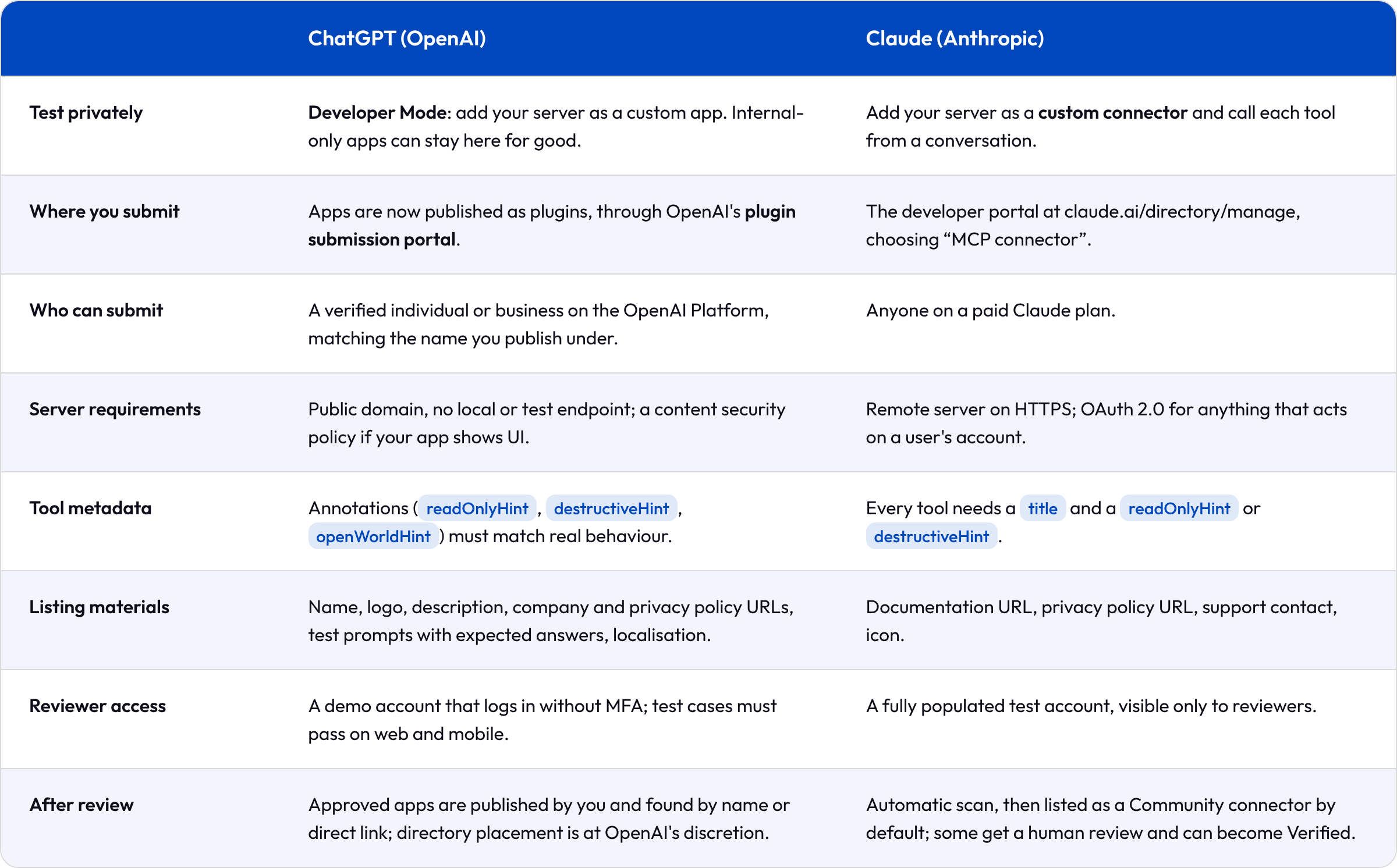
Two details catch European teams out. First, OpenAI projects with EU data residency cannot currently submit apps; you need a project with global data residency. Check this with your DPO early.
Second, your tool metadata is a versioned contract on ChatGPT. A published app keeps the reviewed snapshot of names, descriptions and annotations. Changing them means a new version and a new review, while server-only fixes to results go live straight away.
Both vendors also support MCP Apps, which render interactive UI inside the chat. Start without UI: plain tools are faster to build, review and test.
What to test before you go live
Happy-path demos hide most problems. Before you connect your app to ChatGPT for real users, test these on purpose:
- Real phrasing. Typos, half sentences and every language your customers use. In Belgium, that means at least French, Dutch and English.
- Failures. A record that doesn’t exist, invalid arguments, a permission denial, a backend that’s down. The assistant should tell “not found” apart from “couldn’t check”.
- Follow-ups on their own. “Refund that one” must point to the right record, and it must still go through authorisation.
- Each assistant, again after updates. ChatGPT and Claude pick tools differently, and both change when the vendor ships a new model.
The same test set doubles as your submission material. OpenAI asks for test prompts with expected answers, so write them once and reuse them.
Build, reuse or buy an MCP server
You don’t have to write every server yourself. Many SaaS vendors now publish their own MCP servers, the open-source community maintains many more, and your own systems will need custom ones. In our experience, the label matters less than the code. An “official” server may still lack the one operation you need, while a community project may be excellent or abandoned.
Before you adopt one, check five things:
- It exposes the operations your use case needs, not just the popular ones.
- It’s maintained for the backend version you actually run.
- You can restrict which credentials and operations it gets.
- Its responses are clear enough for a model to read.
- Someone on your side owns it in production: deployment, logs, failures and updates.
Then decide how many servers you need. One server can combine several systems, which keeps policies in one place. Separate servers make more sense when systems have different owners or different security boundaries. Follow your org chart and your risk model, not a rule that fewer is always better.
Start with internal users and read-only tools
The same server can serve your own teams first. Support agents can look up orders and claims from inside Claude instead of switching between three back offices. Developers can ask an assistant why a deployment is failing, if your server exposes pod status and recent logs. We cover these internal use cases in AI agents for your teams.
Internal users are the safer first audience. They forgive rough edges, tell you what’s missing, and their data already sits inside your security perimeter. ChatGPT Business and Enterprise admins can also enable developer mode for internal apps, so no public listing is needed.
Our strongest recommendation: ship read-only tools first. Checking a status or looking something up can’t damage anything, so you learn how real users phrase requests at almost no risk. Actions that change data (book, cancel, pay) come later, with a confirmation step the user approves.
This also makes the internal conversation easier. A security team will approve “the assistant can read the opening hours” in a week. “The assistant can cancel orders” starts a quarter of meetings.
Security questions to answer before you connect your app to ChatGPT
Send this list to your CISO before the first meeting. It saves a round trip, because each answer shapes the design.
- What data leaves our systems, and does the assistant vendor store it?
- How is the user authenticated, and can the assistant ever act beyond that user’s rights?
- Can a malicious prompt, such as text hidden in a document, make the assistant call a tool it shouldn’t? What limits that?
- Where is the server hosted, and in which region?
- How do we switch it off in minutes if something goes wrong?
Good answers exist for each of these, but they are design decisions, not settings. They belong in the first sprint, not the last.
Keeping backend credentials out of the model is good practice, but it isn’t what makes a tool call safe. A model can propose a harmful action without ever seeing a key. Secrets can also leak through tool descriptions, error messages or returned data, so review those as carefully as the code.
One rule answers several questions at once: enforce business rules in the server’s code, never in a prompt. “Never refund more than €200 without approval” written in a tool description is a suggestion. The same rule in code is a control.
When you don’t need MCP to connect your app to ChatGPT
MCP pays off when the same capabilities will serve several AI applications, or when you expect to switch models and want to keep the integration. If you’re building one internal assistant on one stable backend with a predictable flow, a direct API integration is simpler. You’ll have one component fewer to deploy, secure and monitor.
Discovery helps too. Add a tool to your server and a custom connector sees it on the next connection, without a release in each app. Published listings are stricter: on ChatGPT, new or changed tools go through a new review. Either way, treat each new tool like a new API endpoint, with a review and tests before it goes live.
The portability is real but partial. When you switch models, the server stays, but expect to retest, because two models can read the same tool descriptions differently.
MCP also doesn’t remove integration work. Someone still writes and maintains the connection to each backend, and updates it when that backend changes. What MCP gives you is one interface in front of that work, which every assistant can reuse.
If you’re unsure, four questions usually settle it:
- Will more than one assistant or AI application use these capabilities?
- Do you expect to change model or vendor in the next year or two?
- Is there a maintained server you can reuse, or will you build and run your own?
- Would a separate layer make permissions and ownership clearer?
Two or more yeses, and MCP is probably worth it. We’d rather tell you that now than sell you a server you’ll maintain for nothing.
Is it worth connecting your app to ChatGPT and Claude?
We think yes, for one simple reason. When someone asks an assistant a question your business can answer, the assistant will use either your data or someone else’s. Being present in that answer is the new version of being on the first page of Google. MCP is how you connect your app to ChatGPT and Claude with your own data, rather than a stranger’s summary of it.
FAQ: how to connect your app to ChatGPT and Claude
Does MCP work with ChatGPT? Yes. OpenAI supports MCP for connecting ChatGPT to external tools, and its Apps SDK is built on MCP. Claude, Gemini and Microsoft Copilot support it too. Availability by plan changes often, so check each vendor’s current documentation.
How do I get my app listed in ChatGPT and Claude? To connect your app to ChatGPT and Claude for all users, test it privately first: in ChatGPT’s developer mode and as a Claude custom connector. Then submit it through OpenAI’s plugin submission portal and Anthropic’s connector developer portal. Both review your tools, privacy policy and a test account.
Do I need to rebuild my backend for MCP? No. An MCP server is a layer in front of your existing API. If you have no usable API, that is the first project.
Is MCP secure enough for banking or insurance? It can be, but security comes from your design: OAuth, least-privilege tools, read-only first, logging and a kill switch. The protocol doesn’t make those choices for you.
How is MCP different from a normal API? An API is built for developers who read documentation. An MCP server is built for a model that reads tool descriptions and decides on its own when to call them.
Can we use an existing MCP server instead of building one? Often, yes, for third-party tools such as payments or messaging. Check what it exposes, who maintains it and how you can limit its access before you connect it to production data.
What happens to our MCP server if we switch AI models? The server keeps working with any assistant that supports MCP. You will still need to retest, since models choose tools differently from the same descriptions.
Ready to connect your app to ChatGPT?
Want to know which three jobs your app should expose first? Book a 30-minute AI Readiness Call. One of our solution architects will look at your API and auth setup and tell you where we’d start.