




Flutter vs React Native Guide
Flutter vs React Native is rarely a question of which framework is better. Both are mature, both run apps used by hundreds of millions of people, and both shipped major releases in 2026. The right choice depends on three things. How much does your app’s interface have to stand out? What does your team already know? And how long will you maintain the product?
Pick the wrong one and you rarely notice in the first six months. You notice in year two, when hiring is slow, a key SDK lags behind, or every design change takes twice as long as planned.
This Flutter vs React Native guide is for CTOs, product owners and IT managers. They have to make the call and defend it to the rest of the team. It compares the two frameworks on architecture, performance, UI, hiring, enterprise requirements and long-term cost, then gives you a decision tree. It’s written by the team behind Tapptic’s React Native and Flutter development, which ships both.
In short: choose Flutter when a distinctive, pixel-identical interface is part of your product’s value. It’s also the pick if you target desktop or embedded screens. Choose React Native when your team works in JavaScript, TypeScript or React, or shares code with your web product. It’s also the pick when the app must feel like each platform’s own. If the app is mostly deep hardware or OS integration, consider native development instead.
In this guide
- Flutter vs React Native at a glance
- How Flutter and React Native work under the hood
- Flutter vs React Native performance in 2026
- Flutter vs React Native for UI and design systems
- Team skills, hiring and code reuse with your web product
- Platform reach: web, desktop, foldables and embedded screens
- Native SDKs and enterprise requirements
- Flutter vs React Native: maintenance and long-term cost
- Flutter or React Native: a decision tree
- When to choose neither: native or Kotlin Multiplatform
- Already have an app? Don’t rewrite it for the framework
- How we choose between Flutter and React Native at Tapptic
- FAQ: Flutter vs React Native
Flutter vs React Native at a glance
The table below sums up the Flutter vs React Native comparison as of November 2026. Each row is explained further down.
| Flutter | React Native | |
|---|---|---|
| Backed by | Google, with Canonical maintaining desktop | The React Foundation (Linux Foundation) since February 2026; Meta, Microsoft, Amazon and Expo among its members |
| Language | Dart | JavaScript or TypeScript, with React |
| How the UI is drawn | Flutter paints every pixel itself with its Impeller engine | Your components become the platform’s real iOS and Android views |
| Look and feel | Identical on every device, fully custom | Native by default, follows each OS’s conventions |
| Latest stable (Nov 2026) | 3.47, August 2026 | 0.88, October 2026 |
| Release rhythm | A stable release about every three months | A minor release about every two months |
| Platforms | iOS, Android, web, Windows, macOS, Linux, embedded screens | iOS, Android; web, Windows and macOS through community and Microsoft projects |
| Code sharing with a web app | Low: Dart is rarely used on the web side | High: same language, same React skills, often shared logic |
| Hiring pool | Smaller, growing; Dart is quick to learn | Large: any React developer can contribute within weeks |
| Best fit | Brand-led UI, animation-heavy apps, design systems, in-car and kiosk screens | Teams with React skills, products with a strong web side, apps that should feel platform-native |
| Known users | Google Pay, BMW, Toyota, Nubank, SNCF Connect, Crédit Agricole | Facebook, Instagram, Microsoft Outlook and Teams, Amazon Shopping, Shopify |
Sources: Flutter showcase, React Native showcase, release notes linked below.
How Flutter and React Native work under the hood
The biggest difference between Flutter and React Native is who draws the screen. Most of the other trade-offs in this guide follow from it.
Flutter draws everything itself. Your code is written in Dart and compiled ahead of time to native machine code. Flutter doesn’t use the platform’s buttons, lists or text fields: it paints its own widgets onto a canvas with its rendering engine, Impeller. Impeller is the default on iOS and Android, and since Flutter 3.47 (August 2026) on Windows, macOS and Linux too. The result is an app that looks exactly the same everywhere, because Flutter, not the OS, decides every pixel.
React Native uses the platform’s own components. Your code is written in JavaScript or TypeScript with React. A JavaScript engine, Hermes, runs it on the device, and React Native turns your components into real iOS and Android views. A button in a React Native app is a native button, so it behaves like the rest of the phone.
React Native’s architecture changed completely in the last two years. The “bridge” that once slowed it down is gone. Since version 0.82, the New Architecture is the only option. It combines the Fabric renderer, TurboModules and direct calls from JavaScript to native code (JSI). React Native 0.84 made Hermes V1 the default engine and ships precompiled iOS binaries, which shortens build times. Many comparisons online still criticise the bridge; that criticism is out of date.
What this means for you: Flutter gives you total control of the interface and the same behaviour on every device. React Native gives you native behaviour for free and lets your web developers work on the app.
Flutter vs React Native performance in 2026
For most business apps, the Flutter vs React Native performance gap is invisible to users. With well-written code, lists scroll smoothly and screens open fast. Both frameworks reach 60 frames per second, or 120 on high-refresh phones. A slow app in either framework is usually caused by heavy images, too many network calls or unoptimised lists, not by the framework.
The differences show at the edges:
- Complex animation and custom graphics. Flutter has the edge. It renders everything through one engine. Charts, transitions and animated brand elements behave the same on a €150 Android phone as on the latest iPhone.
- Platform-heavy screens. React Native has the edge where the screen is mostly native components: maps, text input, video players, system sheets. They are the real thing, not a re-creation.
- Start-up time and app size. Both add a runtime to your app: Flutter its engine, React Native the Hermes engine. Measure on your own app rather than trusting generic benchmarks, which are often built on demo apps and older versions.
Our advice: if Flutter vs React Native performance is a real worry, prototype the hardest screen of your app in two weeks. Test it on the cheapest device your customers use.
Flutter vs React Native for UI and design systems
This is where the Flutter vs React Native decision is most often settled.
Flutter suits brand-led interfaces. Because Flutter draws every pixel, a design system built in Figma can be reproduced exactly, and it will look identical on iOS and Android. Retail, banking and media brands that treat the app as a flagship often choose Flutter for this reason. Since Flutter 3.47, the Material and Cupertino widgets live in separate packages (material_ui and cupertino_ui). That makes fully custom design systems even cleaner.
React Native suits apps that should feel at home on each platform. Date pickers, menus, scrolling physics and system dialogs behave the way iPhone and Android users expect. When Apple or Google redesign their system controls, as Apple did with Liquid Glass, a React Native app picks up much of the new look with an SDK update. A Flutter app has to wait for its widgets to be updated, or update them itself.
Accessibility works in both, but differently. React Native exposes native views directly to screen readers. Flutter builds a separate accessibility tree that it maps to iOS and Android. Both can meet WCAG 2.1 AA. That matters in the EU, where the European Accessibility Act has applied to many consumer apps since June 2025. In either framework, plan accessibility from the first sprint; it is far more expensive to add at the end.
Team skills, hiring and code reuse with your web product
For many companies, the team decides Flutter vs React Native before any technical argument does.
React Native lets your web team work on mobile. If your web product is built in React, the same developers and TypeScript types can move to the app. Often the business logic, validation and API clients can too. That means one hiring profile and fewer handovers. It’s also why companies with large web products, such as Shopify, Microsoft and Amazon, build mobile apps with React Native.
Flutter needs Dart, which few teams already use. Dart is easy to learn for anyone who knows Java, Kotlin, Swift or TypeScript, and most developers are productive within a few weeks. But your web team won’t share code with the app. And the Flutter hiring pool in Belgium and France is smaller than the React one.
The communities are close in size. In the last Stack Overflow survey with a valid comparison (2024), 9.4% of developers used Flutter and 8.4% used React Native. Among the top 10,000 non-game iOS apps in December 2025, Appfigures detected React Native in 1,350 and Flutter in 1,184 (compiled by Quash). Neither framework is going away.
Platform reach: web, desktop, foldables and embedded screens
Flutter reaches the most screens from one codebase. It targets iOS, Android, web, Windows, macOS and Linux. It also runs on embedded screens: Toyota’s 2026 RAV4 multimedia system runs Flutter. LG is adding Flutter support to webOS (Flutter 3.44 notes). For kiosks, in-store terminals or in-car screens, Flutter is the stronger candidate.
React Native focuses on mobile. Desktop apps are possible through Microsoft’s React Native for Windows and macOS, which Microsoft uses for its own apps. On the web, most teams don’t reuse React Native screens: they share logic with a React web app and build each interface for its medium.
On foldables and large screens, Flutter vs React Native is a draw: both handle them. In both, adaptive layouts are your team’s work, not something the framework does for you. We covered what good foldable apps do in our guide to apps on the iPhone Duo.
Native SDKs and enterprise requirements
Enterprise apps live or die on integrations: payment terminals, identity providers, analytics, mobile device management, scanners. Check these before you settle Flutter vs React Native, because they are where cross-platform projects lose time.
- Third-party SDKs. Most vendors ship native iOS and Android SDKs first. Check that each one you need has a maintained Flutter plugin and React Native module, or budget a few days per SDK to write the wrapper yourself.
- Adding to an existing native app. Both support it: React Native through brownfield integration, Flutter through add-to-app. Microsoft and Amazon run React Native inside large native apps; this route is better documented on the React Native side.
- Updates without the app stores. React Native apps can push JavaScript fixes over the air within Apple and Google’s rules, for example with Expo’s EAS Update. Flutter needs a third-party service such as Shorebird for the same thing. For a bank or retailer that needs to fix a bug on Friday evening, this matters.
- Security. Both support secure storage, certificate pinning, code obfuscation and root or jailbreak detection through maintained libraries. Neither is more secure by default; security comes from how the app is built and tested.
- Swift Package Manager. Apple is moving iOS dependencies away from CocoaPods. Flutter is ahead: 92 of the top 100 iOS plugins have migrated. React Native added experimental support in 0.88 (October 2026).
Flutter vs React Native: maintenance and long-term cost
An app that lives five years costs more after launch than before it. So compare Flutter vs React Native on year three, not on the first release.
Upgrade rhythm. React Native ships a minor version about every two months and supports only the latest few. When 0.84 came out in February 2026, 0.81 lost support. Flutter ships a stable release about every three months. In both, plan at least one framework upgrade per quarter. That comes on top of the yearly iOS and Android SDK requirements every app must meet.
Upgrade pain. React Native upgrades used to be the framework’s weak point. The New Architecture, precompiled iOS builds and Expo’s managed tooling have made them much smoother. Two of the last three releases (0.86 and 0.88) shipped with no user-facing breaking changes. Flutter upgrades are usually easier, but 2026 brings real work. Minimum iOS rises to 15, and the built-in Material and Cupertino libraries are being deprecated.
Dependency risk. In both ecosystems, the risk is rarely the framework itself. It’s the dozens of community packages a typical app depends on, some of which stop being maintained. Choose packages with active maintainers, and keep the list short.
Who stands behind the framework. Flutter is developed by Google, which uses it in Google Pay, Google Ads and NotebookLM; Canonical maintains Flutter on desktop. React Native is no longer owned by Meta. Since February 2026 it belongs to the React Foundation, hosted by the Linux Foundation. Its founding members are Amazon, Callstack, Expo, Huawei, Meta, Microsoft, Software Mansion and Vercel. For a CIO worried about vendor dependence, that independent governance is a point in React Native’s favour.
Cost of people. If you already employ React developers, React Native is usually cheaper to run, because the same people cover web and mobile. If you’re building a mobile team from scratch, the difference is small. A Flutter team can be slightly smaller because there is less platform-specific code to maintain.
Flutter or React Native: a decision tree
Answer these Flutter vs React Native questions in order. The first “yes” usually decides it; if you reach the end, both frameworks will serve you well.
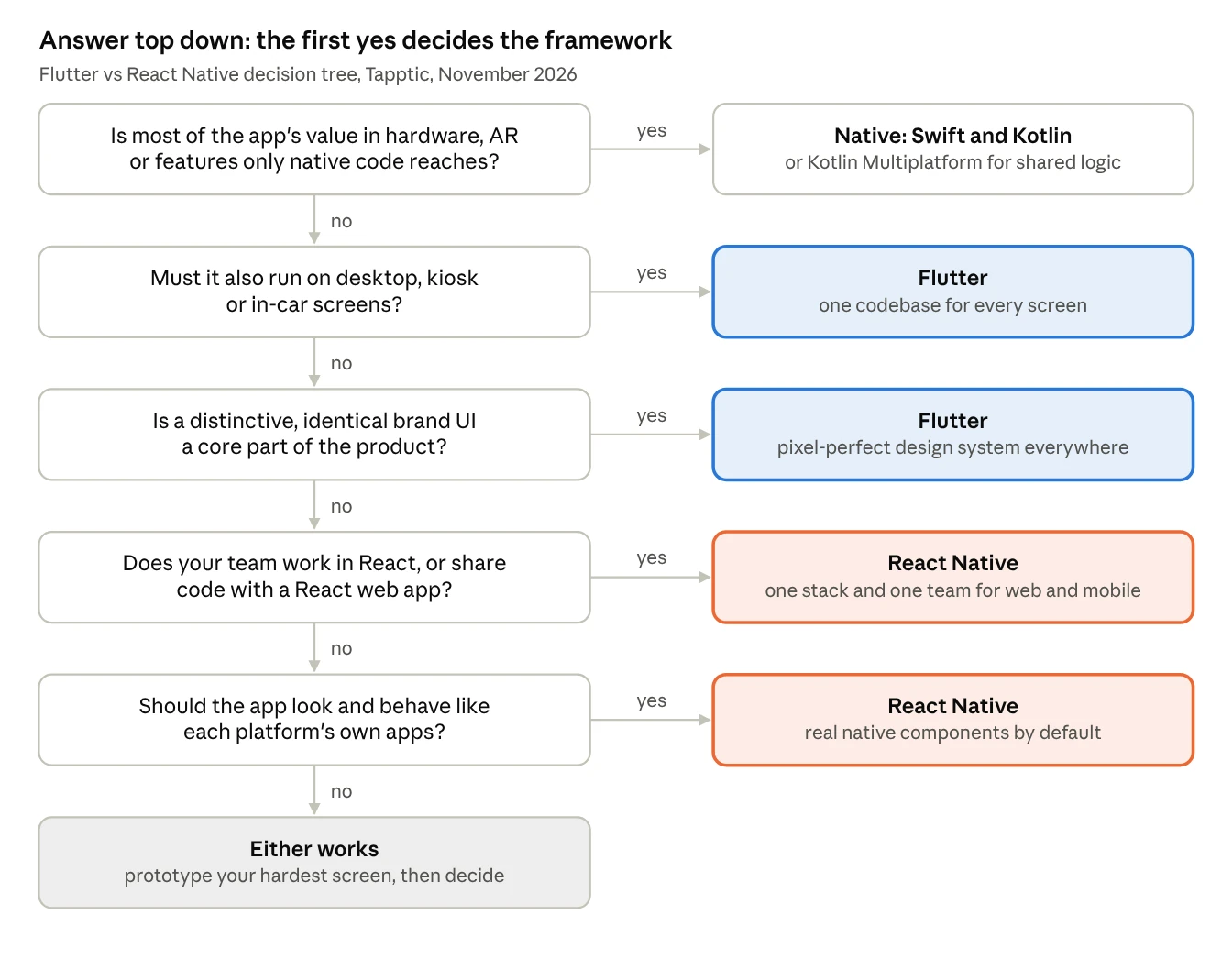
- Is most of the app’s value in hardware, AR or features only native code reaches? If yes, go native, or use Kotlin Multiplatform to share the logic.
- Must the app also run on desktop, kiosk or in-car screens? If yes, choose Flutter.
- Is a distinctive, identical brand interface a core part of the product? If yes, choose Flutter.
- Does your team work in React, or will you share code with a React web app? If yes, choose React Native.
- Should the app look and behave like each platform’s own apps? If yes, choose React Native. If not, either works: prototype your hardest screen and let the result decide.
If questions 3 and 4 both get a yes, you have a real trade-off between design freedom and team efficiency. That’s the case where a two-week prototype in each framework pays for itself.
When to choose neither: native or Kotlin Multiplatform
Sometimes the honest answer to “Flutter or React Native?” is neither.
Go native (Swift and Kotlin) when most of the app’s value sits in the device itself. Think Bluetooth medical or industrial hardware, augmented reality or advanced camera processing. The same goes for features Apple and Google release first, such as widgets, watch apps and CarPlay. Cross-platform apps can include these through native modules, but when they are half the app, you are paying for two worlds. Our native iOS and Android development team handles these projects.
Consider Kotlin Multiplatform when you want native interfaces on each platform but one shared codebase for business logic, networking and data. JetBrains declared Compose Multiplatform for iOS stable in version 1.8.0 in May 2025, so the UI can be shared too. It is a good fit for Android-first teams, but its ecosystem is younger. Appfigures found it in 218 of the top 10,000 iOS apps. Flutter and React Native each appear in more than 1,100.
Already have an app? Don’t rewrite it for the framework
If your current app works, switching from React Native to Flutter or back is rarely worth it on its own. A rewrite costs months and returns, at best, the app you already had. Rewrites pay off when the app also needs a new design, a new architecture or a new business model.
Start with a mobile app audit instead. It tells you what users struggle with, which technical debt slows your team, and whether the framework is part of the problem. If a move is justified, both frameworks can be introduced screen by screen inside an existing app, which spreads the risk.
How we choose between Flutter and React Native at Tapptic
We build apps in both frameworks, so we don’t start with a preference. We start with five questions, scored with your team in a half-day workshop:
- How important is a distinctive interface? Is the app a brand flagship, or a tool that should feel like the phone?
- Who will build and maintain it? Your web team, a new mobile team, or a partner?
- Which integrations are non-negotiable? Every payment, identity, analytics and device-management SDK, checked for both frameworks.
- Which screens do you need beyond phones? Web, desktop, kiosk or in-car.
- How long will the product live, and how often will it change?
When the answers don’t settle it, we build the riskiest screen in a two-week prototype and measure it on real devices. You get a written Flutter vs React Native recommendation with the trade-offs spelled out. Share it with your IT, security and finance colleagues to defend the choice with facts.
Two recent projects show how the answers play out. For Monoprix, we built a complete grocery app in React Native, with order-ahead, in-store scanning and a digital loyalty card. React Native fitted Monoprix’s existing technology ecosystem, which keeps the app maintainable for the long term, and the app now cuts in-store waiting time significantly. For Euroconsumers, we relaunched the TA Invest investment app in Flutter and Material 3, around a new design system that turns dense financial data into a clear daily experience. There, a consistent, brand-led interface on both platforms was the priority.